What Is a Sales Pipeline?
A sales pipeline is a visual representation of where every deal stands in your sales process — from the first touchpoint to closed-won or closed-lost. It shows you how many deals are in play, what stage each one is at, and where your revenue is likely to come from.
Think of it as a map of your team’s active opportunities. Each deal moves through defined stages (prospecting → qualification → demo → proposal → close), and the pipeline gives you a snapshot of the whole landscape at any point in time.
Most CRMs display the pipeline as a Kanban board — columns for each stage, with deal cards you can drag between them. HubSpot, Salesforce, and Pipedrive all use this pattern.
Pipeline vs. Funnel: What’s the Difference?
These terms get used interchangeably, but they describe different things.
A sales pipeline is internal-facing and action-oriented. It tracks what your team is doing — the activities, stages, and next steps for each deal. It answers: “What does our rep need to do next to move this deal forward?”
A sales funnel is outward-facing and conversion-oriented. It tracks how prospects behave — how many enter the top, how many convert at each stage, and how many come out the bottom as customers. It answers: “Where are we losing prospects, and how can we fix the leaks?”
Both matter. Your pipeline drives daily operations. Your funnel reveals systemic conversion problems. In practice, most teams manage them through the same CRM dashboard but think about them differently.
The Standard Pipeline Stages
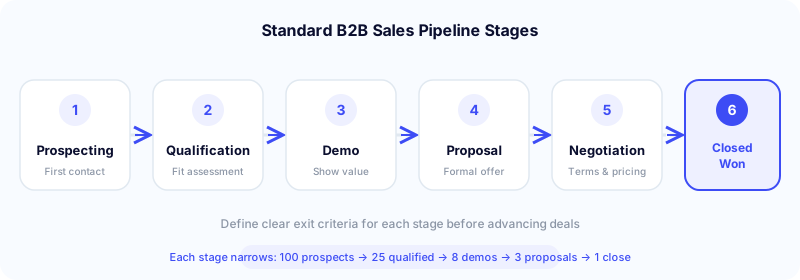
Every company’s pipeline looks slightly different, but most B2B sales pipelines include these stages:
Stage 1: Prospecting
This is where deals enter the pipeline. A rep identifies a potential customer — through cold outreach, inbound lead, referral, or event — and makes the first contact. The goal is to get a response and determine if the prospect is worth pursuing. A parallel dialer with local presence dramatically increases the number of conversations that happen at this stage.
Stage 2: Qualification
The rep assesses whether the prospect fits your ideal customer profile. Do they have the budget? Is there a real need? Do they have the authority to buy? What’s their timeline? Frameworks like BANT (Budget, Authority, Need, Timeline) or MEDDIC are commonly used here.
Stage 3: Demo / Discovery Meeting
The prospect has agreed to a deeper conversation. This is where you present your solution, understand their specific pain points, and demonstrate how you solve them. The goal is to confirm mutual fit and advance to a proposal.
Stage 4: Proposal / Quote
You’ve presented the solution; now you formalize the offer. This stage includes pricing, scope, terms, and any customization. Deals often stall here waiting for internal approvals on the prospect’s side.
Stage 5: Negotiation
Price discussions, contract redlines, legal review, procurement involvement. This stage can be quick (SMB deals) or take months (enterprise).
Stage 6: Closed-Won / Closed-Lost
The deal ends. Either the prospect signs (closed-won) or they don’t (closed-lost). Both outcomes matter — won deals feed revenue, and lost deal analysis reveals what went wrong and where you can improve.
The key to making stages useful: define clear exit criteria for each one. A deal should only move from Qualification to Demo when specific conditions are met (e.g., “Budget confirmed, decision-maker identified, discovery call completed”). Without exit criteria, stages become subjective and pipeline data becomes unreliable.
The Metrics That Matter
Pipeline Coverage Ratio
This answers: “Do we have enough pipeline to hit our number?”
The formula: Total Pipeline Value ÷ Quota = Coverage Ratio.
The rule of thumb is 3x — you need $3 in pipeline for every $1 of quota, assuming roughly a 33% close rate. But the right ratio depends on your win rate:
- 50% win rate → 2x coverage is sufficient
- 33% win rate → 3x coverage
- 25% win rate → 4x coverage
- 20% win rate → 5x coverage
Enterprise sales teams with longer cycles and lower win rates often need 4-5x. High-velocity SMB teams with higher close rates can operate on 2-3x.
If your coverage drops below your target ratio, it’s an early warning that you’re not generating enough new opportunities — and quota attainment will suffer in the coming weeks or months.
Pipeline Velocity
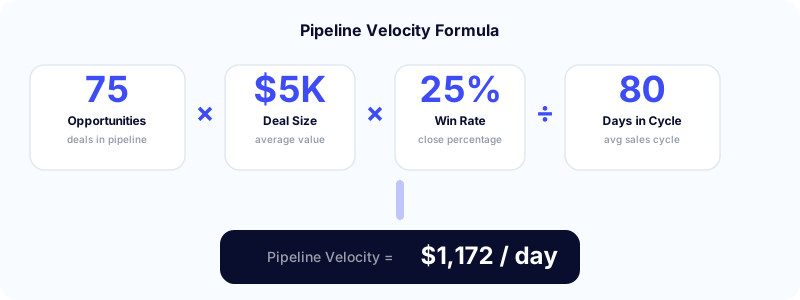
This measures how fast money moves through your pipeline. It’s one of the most useful composite metrics in sales because it captures four variables in a single number.
Formula:
(Number of Opportunities × Average Deal Size × Win Rate) ÷ Average Sales Cycle Length (days) = Revenue per Day
Example:
75 deals × $5,000 deal size × 25% win rate ÷ 80-day cycle = $1,172 per day
To increase velocity, you can improve any of the four inputs: generate more opportunities, increase deal size, improve win rate, or shorten the sales cycle.
Research from Factors.ai found that companies tracking velocity weekly achieve 87% forecast accuracy, compared to 52% for those who track it irregularly.
Win Rate
Closed-won deals ÷ total deals that reached a decision stage = win rate.
Average B2B win rates vary widely by industry and deal size. First Page Sage data shows average B2B conversion rates around 4.79%, with top performers reaching 12.44%. But “win rate” is usually measured from qualified pipeline (Stage 2+), not from raw leads — so expect higher percentages when measuring from qualification onward.
Average Sales Cycle Length
The number of days from opportunity creation to close. This varies dramatically:
- SMB deals: 14-30 days
- Mid-market: 30-90 days
- Enterprise: 90-180+ days
Track this by deal size and segment. If your average cycle is creeping up, it usually means deals are stalling in negotiation or proposal stages — a sign that exit criteria may need tightening or that reps need better tools for handling late-stage objections.
Common Pipeline Mistakes
Stale deals. The #1 pipeline problem. Deals sit in the same stage for weeks or months with no activity, inflating your pipeline value and giving a false sense of security. Fix: set stage-specific aging thresholds (e.g., any deal in “Proposal” for more than 14 days without activity gets flagged) and review them weekly.
No exit criteria. Without defined conditions for advancing a deal, reps move deals forward based on gut feeling. “They seemed interested” is not an exit criterion. “Budget confirmed, decision-maker agreed to proposal review by Friday” is.
Sandbagging. Reps intentionally hold back closeable deals to push them into the next quota period. This destroys forecast accuracy and prevents leadership from making informed resource decisions. The fix is a culture issue, not a process one — reps need to trust that consistently hitting quota is rewarded, not penalized with a raised target.
Over-stuffed pipeline. Too many low-quality deals dilute focus. Reps spread their attention across 50 opportunities when 15 of them are real. Better to have a smaller, healthier pipeline where reps can give meaningful attention to each deal.
Ignoring closed-lost analysis. Most teams celebrate wins and move on from losses. But closed-lost deals contain the most useful data in your pipeline — why the prospect said no, where the deal stalled, what the competitor offered. Review every closed-lost deal monthly and look for patterns.
How Outbound Calling Feeds the Pipeline
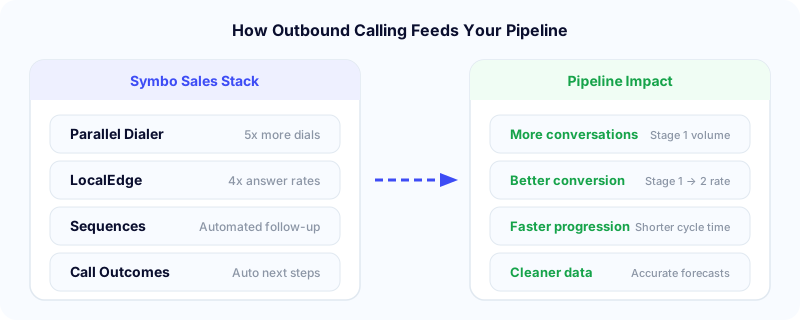
Your pipeline is only as strong as what you put into it. For outbound teams, the top of the pipeline — prospecting — is directly driven by calling activity.
Here’s where dialing tools connect:
- Power and parallel dialers increase the volume of first touches, generating more Stage 1 entries
- Local presence dialing improves answer rates, meaning more of those dials turn into actual conversations
- Call outcomes create structured data about each call — and in Symbo, outcomes automatically trigger next steps like updating prospect status, starting a new sequence, or moving the deal to the right pipeline stage
- Sequences automate the multi-touch cadences that keep prospects moving from first contact to qualification
- Coaching and analytics give managers visibility into call quality, rep performance, and conversion rates across pipeline stages
- CallerGuardian spam monitoring protects your caller ID reputation from spam flags, ensuring your prospecting calls actually reach prospects
The connection between calling activity and pipeline health is direct: more quality conversations at the top means more qualified deals in the middle and more revenue at the bottom. For a deep dive on the highest-leverage feature for answer rates, see what local presence dialing is and how it works.
Building Your Pipeline: A Practical Approach
Step 1: Define your stages. Start with 5-6 stages that match your actual sales process. Don’t copy a template blindly — map the stages to the real buyer journey your prospects go through.
Step 2: Set exit criteria for each stage. Write down the specific conditions that must be true before a deal can advance. Make these observable actions (“prospect confirmed budget in writing”), not assumptions (“I think they have budget”).
Step 3: Calculate your coverage target. Look at your historical win rate and set the right multiplier (3x, 4x, etc.) relative to quota.
Step 4: Set up your CRM. Configure pipeline stages, required fields, and automation triggers. With a native CRM integration, call outcomes and deal updates sync automatically — reps don’t need to manually log anything.
Step 5: Run weekly pipeline reviews. Every week, review every deal in the pipeline with the team. Ask three questions per deal: What happened this week? What’s the next step? When will it happen? Flag stale deals and push for action or removal.
Step 6: Measure and iterate. Track velocity, coverage, and win rate monthly. Look for patterns in where deals stall and where they convert. Adjust your stages, messaging, or resources based on the data.
The Bottom Line
A sales pipeline isn’t just a CRM view — it’s the operating system for your revenue team. When it’s well-defined and actively managed, it tells you where you stand, where the risks are, and what your team needs to do next.
Research from Harvard Business Review found that companies with a formal, well-managed sales process see 18% more revenue growth than those without one. And organizations with effective pipeline management see 28% higher revenue growth overall.
The teams that hit quota consistently aren’t the ones with the most deals — they’re the ones with the clearest view of which deals are real, what stage they’re actually in, and what needs to happen next.
Symbo gives your team the tools to fill the pipeline faster and move deals through it. Parallel and power dialing with local presence drives more Stage 1 conversations. Automated sequences keep prospects engaged across channels. Call outcomes trigger the right next step automatically. And real-time analytics show you exactly where deals are stalling. See how it works →