What Are Call Outcomes?
A call outcome (also called a call disposition) is a label a rep assigns after each call to describe what happened. Did the prospect answer? Were they interested? Did they ask for a callback? Was it a wrong number?
Call outcomes turn every dial into structured data your CRM and dialer can act on — powering follow-up automation, sequence chaining, reporting, and pipeline hygiene. Without them, you’re left guessing.
You’ll also hear these called disposition codes, call tags, or activity codes. They all mean the same thing: a standardized way to categorize every call so nothing falls through the cracks.
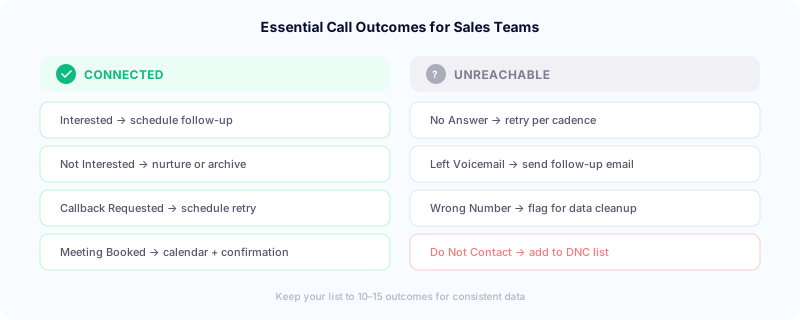
The Essential Call Outcomes
Every sales team’s list will look slightly different, but here are the outcomes most outbound teams need:
Connected outcomes:
- Connected — Interested: Prospect engaged, wants to continue the conversation. Next step: schedule follow-up or demo.
- Connected — Not Interested: Prospect answered but isn’t a fit or isn’t interested. Next step: move to nurture or archive.
- Connected — Callback Requested: Prospect asked you to call back at a specific time. Next step: schedule the callback.
- Meeting Booked: The call resulted in a scheduled meeting or demo. This is the outcome you’re tracking most closely.
- Gatekeeper: Reached a receptionist, assistant, or someone who isn’t the decision-maker. Next step: try direct line or different time.
- Disqualified: Prospect doesn’t match your ICP (wrong industry, too small, wrong role). Next step: remove from campaign.
Unreachable outcomes:
- No Answer: Phone rang, no one picked up. Next step: retry per your cadence schedule.
- Left Voicemail: No answer, but you dropped a voicemail. Next step: send follow-up email, schedule retry.
- Busy Signal: Line was busy. Next step: retry in 1-2 hours.
- Wrong Number: Number doesn’t belong to the intended prospect. Next step: flag for data cleanup.
- Disconnected / Not in Service: Number is dead. Next step: remove from list.
Compliance outcomes:
- Do Not Contact: Prospect explicitly asked not to be called. Next step: add to internal DNC list immediately. You’re legally required to honor this.
Industry consensus recommends keeping your total list to 10-15 outcomes. Fewer outcomes mean faster selection, more consistent usage, and cleaner data. Going above 20 almost always leads to reps either guessing or skipping the step entirely.
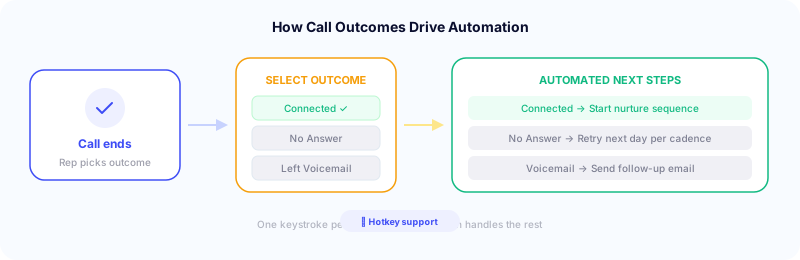
In Symbo’s dialer, reps select outcomes with a single keystroke — no dropdowns, no mouse clicks. This keeps the flow fast and ensures every call gets tagged.
Why Call Outcomes Matter More Than You Think
Call outcomes look like a small operational detail, but they’re the backbone of three critical workflows. Combined with local presence dialing to maximize answer rates, structured outcomes ensure every conversation counts.
Reporting that’s actually useful. Without outcomes, your CRM can tell you how many calls were made but not what happened on those calls. With outcomes, managers can see connection rates, interest rates, meeting conversion rates, and disqualification rates — broken down by rep, campaign, list, or time period. Symbo’s coaching and analytics dashboard surfaces this data in real time.
Automation triggers. This is where outcomes pay for themselves. In Symbo, call outcomes don’t just label calls — they trigger actions automatically. A single outcome can start or end a sequence, update a prospect’s status in your CRM, change a lead stage, fire a webhook to external tools, send a follow-up email, schedule a callback, or remove someone from all campaigns. When a call connects and the prospect is interested, the cold outreach sequence ends, the CRM status updates to “Engaged,” and a nurture cadence begins — all from one keystroke. Every outcome becomes an automated next step — no manual work required.
Pipeline hygiene. Outcomes reveal patterns in your data. If 30% of calls hit “Wrong Number,” your list needs cleaning. If “Gatekeeper” is dominating, you need better direct dials. If “Not Interested” is high on a specific campaign, the messaging might be off. Without outcomes, these problems hide in aggregate call counts.
How Call Outcomes Work with Your CRM
The best setup is a dialer that handles outcome-based automations natively — not one that dumps a label into your CRM and relies on you to build Salesforce flows or HubSpot workflows to act on it.
In Symbo, outcome automations run inside the platform. When a rep selects “Connected — Interested,” Symbo can update the prospect status, end the current sequence, start a nurture cadence, and sync everything to your CRM — all from the outcome trigger. You don’t need to build separate CRM automations to handle follow-ups.
Outcomes sync to your CRM automatically through Symbo’s native integrations:
- Salesforce: Maps to the
CallDisposition field on Task records by default — no custom field setup required
- HubSpot: Syncs to a contact property via the embedded dialer widget
- Pipedrive, Zoho, GoHighLevel: Native CRM widgets handle the mapping automatically
- Bullhorn: Syncs via the Symbo Chrome extension to activity records
The key: make outcome selection mandatory in the call wrap-up flow. If it’s optional, reps will skip it when they’re busy — and your data becomes unreliable. In Symbo, outcome selection is required before advancing to the next call — and with hotkey support, it takes one keystroke.
Automating Next Steps Based on Outcomes
Here’s where call outcomes compound your team’s effectiveness. Map each outcome to a specific automated action:
| Outcome | Automated Actions |
|---|
| Connected — Interested | Update status to “Engaged” + end cold sequence + start nurture cadence |
| Callback Requested | Schedule dialer retry at specified time + CRM task |
| Left Voicemail | Send follow-up email + schedule retry in 2 days |
| No Answer | Continue cadence — retry per schedule |
| Meeting Booked | Update status to “Meeting Set” + send confirmation + notify AE |
| Not Interested | Update status + move to long-term nurture sequence |
| Do Not Contact | Add to DNC list + remove from all campaigns + update CRM |
| Wrong Number | Flag for data cleanup + remove from call list |
Without this automation, reps have to manually manage follow-ups, status updates, and handoffs for every call. At 100+ calls per day with a power dialer, that’s impossible to maintain without things falling through the cracks. In Symbo, all of this runs natively from the outcome trigger — sequence chaining, status updates, CRM syncs, and follow-ups all fire automatically.
Outcome Reporting: What Managers Should Track
With real-time analytics, managers can track outcomes as they happen — not after the fact.
Daily team dashboard:
- Total calls by outcome (pie chart or bar chart showing outcome distribution)
- Connection rate: (Connected outcomes / Total calls) × 100
- Meeting booking rate: (Meetings Booked / Connected calls) × 100
- Outcome completion rate: (Calls with outcomes / Total calls) × 100 — this measures whether reps are actually using the system
Weekly trends:
- Disposition shifts over time — are “Not Interested” rates increasing? Is “Wrong Number” spiking on a particular list?
- Rep-by-rep comparison — who has the highest meeting-to-connection ratio? Who’s flagging the most disqualified leads (might indicate poor list targeting)?
- Campaign performance — which campaigns produce the most “Interested” vs “Not Interested” calls?
Monthly strategic review:
- Lead source quality based on disposition distribution (which lead sources produce the most meetings vs. wrong numbers?)
- List hygiene metrics (what percentage of your database has been dispositioned as wrong number, disconnected, or DNC?)
- Automation effectiveness (are follow-up sequences triggered by dispositions actually converting?)
Common Mistakes (And How to Fix Them)
Too many outcomes. When reps face 25+ options in a dropdown, they pick randomly or skip the field. Cap your list at 10-15 and be ruthless about cutting outcomes nobody uses. Review usage monthly — if an outcome accounts for less than 2% of calls, consider merging it into another.
Inconsistent definitions. “Interested” means one thing to one rep and something different to another. Write one-sentence definitions for every outcome and make them available during onboarding and in the dialer interface.
Making outcomes optional. If outcome selection isn’t required to advance to the next call, completion rates drop below 70% during busy periods. Make it mandatory — with hotkey dispositions, it takes one keystroke.
Not training on outcomes. Run new reps through 10-15 example call scenarios and have them select the correct outcome for each. It takes 15 minutes and dramatically improves data consistency.
Ignoring the data. Some teams set up outcomes perfectly but never look at the reports. Schedule a 15-minute weekly review of outcome data with your team. Patterns reveal coaching opportunities, list problems, and messaging gaps faster than anything else.
Getting Started
If you don’t have call outcomes set up yet, start simple:
- Pick 8-10 outcomes from the list above that match your sales process
- Write a one-sentence definition for each
- Configure them in your dialer and CRM (as a mandatory field)
- Train your team with example scenarios
- Review the data weekly for the first month, then adjust based on what you’re actually seeing
If you already have outcomes but they’re not being used consistently, the fix is almost always the same: reduce the number of options, make selection mandatory, and retrain the team with clear definitions.
Call outcomes aren’t glamorous, but they’re the connective tissue between your calling activity and your pipeline intelligence. Get them right, and every call your team makes becomes structured data that drives automated follow-up, real-time reporting, and revenue.
Symbo’s dialer has built-in call outcomes with hotkey selection that sync to your CRM and trigger sequence automations automatically. Pair with LocalEdge for higher answer rates and CallerGuardian to keep your numbers clean. Book a demo to see how it works, or check pricing to get started.