What Is an Outbound Dialer?
An outbound dialer is a phone system built specifically for outbound sales calling. It gives reps everything they need to make outgoing calls efficiently — from click-to-dial with full CRM context all the way up to parallel dialing systems that call multiple prospects simultaneously.
The “outbound” part describes the use case, not the level of automation. A click-to-dial Chrome extension that lets reps call directly from their CRM is an outbound dialer. So is a parallel dialer running hundreds of calls per day. What they share is a common purpose: they’re designed from the ground up for placing outbound sales calls, with features like caller ID management, call recording, CRM integration, and disposition tracking that generic phone systems don’t offer.
Where automation comes in is scale. As call volume increases, outbound dialers offer progressively more automation — from auto-advancing through a list (power dialer) to dialing multiple numbers at once (parallel dialer). The best platforms give you all three modes so you can match the approach to the campaign.
What Makes an Outbound Dialer Different from a Regular Phone System?
A generic VoIP or business phone system lets you make calls. An outbound dialer helps you sell. The difference is in the sales-specific tooling built around the call itself:
- Caller ID management — control which number displays on the prospect’s phone, rotate through multiple DIDs to prevent spam flagging, and monitor number health across carriers so you know when a number needs to be retired
- Local presence dialing — automatically match your outbound caller ID to the prospect’s area code. A Software Advice study found that prospects answer local numbers at nearly 4x the rate of toll-free numbers (27.5% vs 7%). This single feature can transform answer rates overnight without changing anything else about your process
- Call lists and lead queuing — load a prioritized list of prospects and work through them systematically instead of hunting for the next number to dial
- Voicemail drop — leave a pre-recorded voicemail with one click instead of spending 20-30 seconds recording a fresh message on every unanswered call
- Live call dispositions — tag every call with a standardized outcome (connected, voicemail, wrong number, meeting booked) that your CRM and follow-up workflows can act on
- Call recording and transcription — capture every conversation for coaching, compliance, and deal review. Modern dialers add AI summaries so managers don’t have to listen to hours of audio
- CRM sync — call activity, notes, recordings, and outcomes log automatically on the contact record. Reps never have to tab over and manually update the CRM after each call
- Sequence integration — calls fit into multi-step cadences alongside emails and tasks, so a “left voicemail” disposition can automatically trigger a follow-up email an hour later
- Real-time analytics — managers see dials, connections, talk time, and meetings booked as they happen, not in a report the next day
- DNC and compliance tools — automatic scrubbing against Do-Not-Call lists, calling hour enforcement by time zone, and opt-out tracking built into the workflow
None of these things exist in a standard phone system. Together, they turn calling from a manual, error-prone activity into a structured, measurable sales process.
The 3 Dialer Modes That Matter for B2B Sales
The industry talks about five dialer types (preview, progressive, power, parallel, predictive), but for B2B sales teams, only three modes actually matter. Predictive dialers are built for large call centers with 50+ agents — they over-dial aggressively and create compliance headaches that B2B teams don’t need. And the old distinction between “preview” and “progressive” dialers has been replaced by modern click-to-dial with full CRM context.
Here’s what a modern B2B sales dialer should offer:
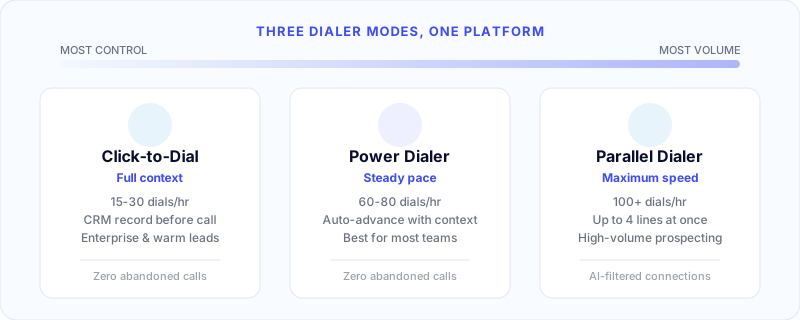
1. Click-to-Dial
How it works: The dialer shows the prospect’s full CRM record — name, company, past interactions, deal stage, notes. The rep reviews the details, then clicks to dial when ready. Calls can be placed from inside the CRM, from a Chrome extension on any web page, or from the dialer interface.
Speed: Deliberate. Reps control the pace entirely.
Best for: Enterprise and complex sales where preparation matters — high-value accounts, warm follow-ups, or any situation where the rep needs full context before speaking. This is your “sniper” mode.
Dials per hour: 15-30, depending on conversation length and prep time.
2. Power Dialer
How it works: Automatically dials the next number as soon as the rep finishes the previous call. If the call goes to voicemail, the rep can drop a pre-recorded message with one click and move immediately to the next call. The CRM record loads automatically so the rep has context.
Speed: Fast. Most teams see 60-80 dials per hour — roughly 3-4x manual dialing.
Best for: The workhorse for most B2B sales teams. Power dialers hit the sweet spot between efficiency and control. Reps know who they’re calling, can prepare briefly, and move through lists at a steady clip. Works for teams of any size.
Trade-off: One call at a time. You won’t match the raw volume of a parallel dialer, but you get better call quality and simpler compliance.
3. Parallel Dialer
How it works: Dials up to 4 numbers simultaneously. AI detection identifies which calls reach a live human versus voicemail, IVR, or no answer. The first live answer connects to the rep instantly — no awkward pause, no robocall delay. Other lines drop silently.
Speed: Very fast. 200-300+ dials per day, roughly 2-3x a power dialer.
Best for: High-volume cold prospecting, SDR teams focused on booking meetings, and any scenario where maximizing conversations-per-rep is the primary goal.
Trade-off: Reps don’t know who they’re talking to until the call connects, so there’s no prep time. Also requires compliance awareness — the FTC’s Telemarketing Sales Rule limits “abandoned calls” (where a prospect answers but isn’t connected to a rep within 2 seconds) to no more than 3% of answered calls per 30-day campaign.
Quick Comparison
| Feature | Click-to-Dial | Power Dialer | Parallel Dialer |
|---|
| Dials at a time | 1 (manual) | 1 (auto) | Up to 4 (auto) |
| Rep prep time | Full CRM context | Brief | None |
| Dials per hour | 15-30 | 60-80 | 100+ |
| Abandoned call risk | None | None | Low (with proper setup) |
| Best for | Enterprise, warm follow-ups | General prospecting | High-volume cold outreach |
| Call quality | Highest | High | Good |
The best dialer platforms give you all three modes in one tool so you can switch based on the day’s campaign — power dial for general prospecting in the morning, click-to-dial for warm follow-ups in the afternoon, parallel dial to blitz through a fresh list.
7 Features That Separate Good Dialers from Great Ones
Once you know which dialer modes you need, the next decision is which platform to buy. These features make the difference:
1. Local Presence Dialing
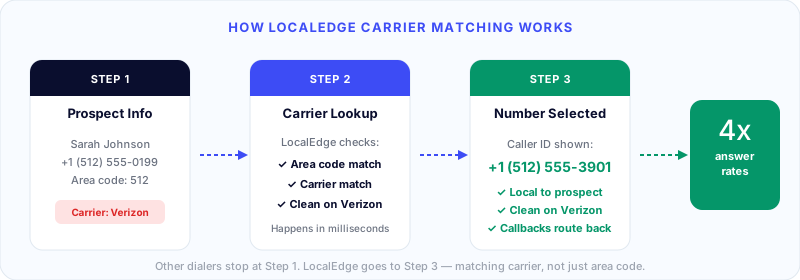
This is the single highest-leverage feature for answer rates. Local presence matches your outbound caller ID to the prospect’s area code — so a Dallas prospect sees a 214 number instead of your Chicago 312. Software Advice found that prospects answer local numbers at nearly 4x the rate of toll-free numbers (27.5% vs 7%).
But basic area code matching isn’t enough. The best local presence dialers go further — matching the prospect’s carrier (AT&T, Verizon, T-Mobile) and selecting a number verified clean on that specific network. A number can be flagged on Verizon but clean on AT&T. If your prospect is on Verizon, showing them a Verizon-flagged number kills the call before it starts. Symbo’s LocalEdge handles this carrier-level matching automatically.
2. Voicemail Drop
About 80% of outbound calls go unanswered. Without voicemail drop, your reps spend 20-30 seconds recording a message on every single one. Voicemail drop lets them leave a pre-recorded message with one click and immediately move to the next call. Over a full day of calling, this saves 30-60 minutes of wasted time.
3. CRM Integration
Your dialer must sync bidirectionally with your CRM — HubSpot, Salesforce, Bullhorn, or whatever you use. That means call activity, recordings, dispositions, and notes log automatically on the contact record. If reps have to manually log calls after hanging up, two things happen: they stop doing it, and your CRM data becomes unreliable.
The best dialers embed directly inside your CRM as a native widget — so reps never leave the tool they already work in.
4. Call Recording and AI Transcription
Every call should be recorded (with proper consent where required). But recording is table stakes — what matters is what you do with the recordings. Modern dialers add AI transcription and call summaries so managers can review conversations in minutes instead of listening to hours of audio. The best platforms extract action items, flag objections, and surface coaching opportunities automatically.
5. Disposition Codes and Workflow Automation
After every call, reps select a disposition code — “connected - interested,” “left voicemail,” “wrong number,” “do not contact.” These codes should trigger automated next steps: “callback requested” schedules a retry, “left voicemail” sends a follow-up email, “do not contact” adds to your internal DNC list. Without this automation, follow-up falls through the cracks at scale.
6. Spam Monitoring and Caller ID Health
Even with legitimate local presence numbers, high-volume outbound calling can trigger carrier spam filters. Your dialer should actively monitor whether your numbers are being flagged as spam by major carriers (T-Mobile, AT&T, Verizon) and alert you before it impacts answer rates. Symbo’s CallerGuardian does this continuously — placing real test calls on major carriers and automatically rotating flagged numbers out of your pool before they reach a single prospect.
7. Real-Time Analytics
You need live visibility into dials per hour, connection rates, average talk time, meetings booked, and disposition breakdowns — by rep, by campaign, and by time period. If your analytics are delayed by even a day, you can’t course-correct fast enough. The best dialer dashboards let managers see what’s happening right now and intervene in real time.
Metrics You Should Track
An outbound dialer generates a lot of data. These are the metrics that actually drive decisions:
Dial-to-connect rate — What percentage of dials result in a live conversation? Industry average for B2B is around 16-17%. If you’re below 10%, your list quality or calling times need work. If you’re above 20%, your data is strong.
Conversations per rep per day — The volume metric that matters most. Manual dialing: 10-15 conversations. Power dialer: 25-40. Parallel dialer: 40-60+.
Talk time per hour — How many minutes per hour are reps actually speaking with prospects? Manual: ~15 minutes. Power dialer: ~25-30 minutes. This is the clearest measure of dialer ROI.
Meeting booking rate — Conversations that convert to a scheduled meeting or demo. Average B2B benchmark is 2-5% of dials (or 15-25% of connected calls, depending on list quality and rep skill).
Abandoned call rate — Critical for compliance if you’re using parallel dialing. Must stay below 3% of answered calls per 30-day campaign. Monitor this continuously.
Cost per conversation — Total dialer cost (software + numbers + calling minutes) divided by total conversations. This is your true unit economics number for outbound.
How to Choose the Right Dialer
The choice isn’t really about technology — it’s about your team’s workflow and goals.
Start with your calling volume. If reps make fewer than 30 calls per day, click-to-dial with CRM context is all you need. At 30-100 calls per day, a power dialer delivers the best balance of speed and quality. Above 100 calls per day, parallel dialing is worth evaluating.
Consider your deal size. Enterprise deals ($50K+) warrant the prep time of click-to-dial. High-velocity deals ($1K-$25K) benefit from the volume of power or parallel dialing. The higher the deal value, the more each individual call matters.
Look for flexibility. The best dialer gives you all three modes in one platform. Monday morning blitzing a new list? Parallel dial. Tuesday afternoon following up on warm leads from the week? Click-to-dial with full CRM context. One tool, different modes for different work.
Don’t overlook local presence. This is often worth more than the dialer mode itself. A power dialer with good local presence will outperform a parallel dialer without it — because answer rate is the foundation everything else depends on.
Evaluate CRM integration depth. The best dialer in the world is useless if it doesn’t talk to your CRM. Check that the integration is bidirectional, real-time, and maps to your existing fields and workflows — not just a basic activity log.
Why B2B Sales Teams Choose Symbo
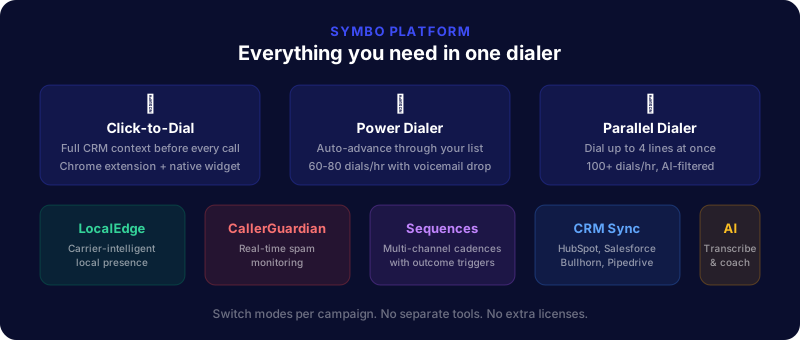
Most dialers force you to pick a lane — power dialing or parallel dialing, with local presence as an expensive add-on. Symbo gives you everything in one platform.
Three dialer modes, one tool. Power dial, parallel dial, and click-to-dial — switch between modes per campaign. Parallel dial to blitz through a cold list, power dial for steady prospecting, click-to-dial for enterprise follow-ups. No separate tools, no extra licenses.
Local presence that actually works. LocalEdge doesn’t just match the area code — it matches the carrier. Thousands of monitored local numbers across the US, Canada, UK, and Australia, with carrier-intelligent matching that ensures your number is clean on your prospect’s specific network. Most local presence dialers stop at the area code. LocalEdge goes further.
Spam protection built in. CallerGuardian continuously monitors your numbers by placing real test calls on major carriers. Flagged numbers are pulled from rotation and replaced automatically — before they impact your answer rates.
Native CRM dialer. Symbo embeds directly inside Salesforce, HubSpot, Pipedrive, Zoho, and GoHighLevel. Calls, recordings, dispositions, and AI summaries sync automatically. Reps never leave their CRM.
Sequences and automation. Calls fit into multi-step sequences alongside emails and tasks. A “left voicemail” disposition automatically triggers a follow-up email. A “connected — interested” outcome ends the sequence and starts a nurture cadence. Outcomes drive the next step automatically.
AI transcription and coaching. Every call is transcribed and summarized. Managers get coaching insights without listening to full recordings.
Getting Started
If your team is still dialing manually, here’s the path:
-
Audit your current state. How many dials per day? What’s the connection rate? How much time do reps spend on non-selling activities (dialing, logging, note-taking)?
-
Pick the right starting mode. Most teams start with power dialing and add parallel dialing once reps are comfortable with the pace.
-
Run a pilot. Start 2-3 reps on the dialer for 30-60 days. Measure dials per day, conversations, meetings booked, and talk time per hour versus your baseline.
-
Set up automations from day one. Disposition codes, voicemail drop templates, follow-up email triggers. These multiply the dialer’s value.
-
Monitor and optimize. Review metrics weekly. Adjust calling windows, list targeting, and cadence timing based on what the data shows.
The teams that get the most from outbound dialers aren’t just making more calls — they’re making smarter calls, with better data, better timing, and better follow-up at every stage.
Ready to see it in action? Book a demo and we’ll show you how Symbo’s dialer works for your team.