What Is a Power Dialer?
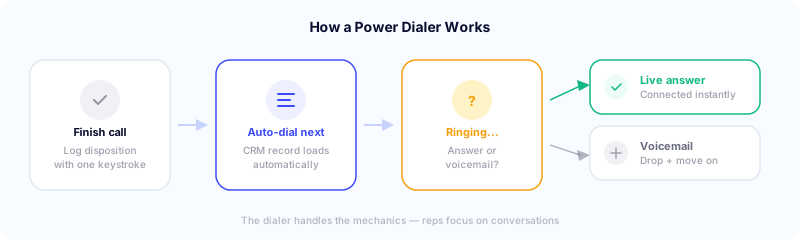
A power dialer is an outbound calling tool that automatically dials the next number on your list when you finish a call. It operates on a one-to-one ratio: one rep, one call at a time, with the system handling the dialing so the rep can focus on conversations.
Here’s the typical flow:
- Rep finishes a call and logs a disposition (e.g., “left voicemail,” “meeting booked”)
- The dialer automatically initiates the next call on the list — no manual dialing needed
- If the call goes to voicemail, the rep can drop a pre-recorded message with one click and move on
- If someone answers, the rep is connected immediately
- Between calls, the CRM record for the next prospect loads automatically, giving the rep context before the conversation starts
The result: reps spend more time talking and less time dialing, waiting, and navigating between records.
Power Dialer vs. Other Dialer Types
The dialer landscape has a lot of overlapping terminology. Here’s how a power dialer compares:
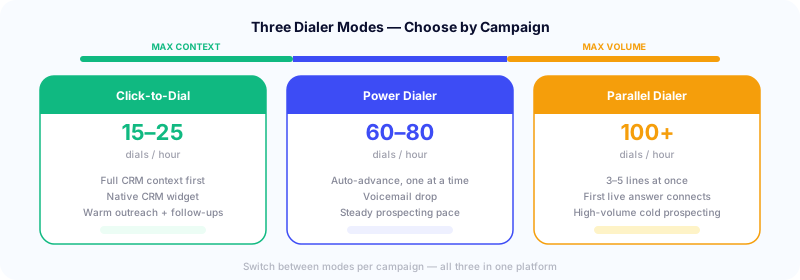
Manual dialing is what it sounds like — reps look up a number, dial it, wait, and repeat. Most teams average 15-25 dials per hour manually. It’s the baseline.
Power dialer auto-advances through a list one call at a time. Reps typically reach 60-80 dials per hour — roughly 3-4x manual dialing. The rep maintains full control of pacing and has context on who they’re about to call.
Parallel dialer dials multiple numbers simultaneously (typically 3-5 at once) and connects the rep to the first live answer. Higher volume — 100+ dials per hour — but the rep doesn’t know who they’re talking to until the call connects. Best for high-volume cold prospecting where speed matters most.
Click-to-dial shows the prospect’s CRM record first so the rep can review full context, then click to dial. Lowest volume but highest quality — ideal for warm outreach, follow-ups, and account-based selling. With a native CRM dialer widget, reps dial directly inside Salesforce, HubSpot, Pipedrive, Zoho, or GoHighLevel without switching tabs.
Predictive dialer uses an algorithm to predict when a rep will be available and starts dialing ahead of time. Primarily used in large call centers. Can create abandoned calls when multiple prospects answer simultaneously, which raises compliance concerns.
The key distinction: power dialers give reps the most control while still automating the mechanical work of dialing. They sit between click-to-dial (maximum context, lower volume) and parallel dialing (maximum volume, less context). Most modern platforms like Symbo offer all three modes so teams can switch based on the campaign.
How Many Calls Can You Actually Make?
The most common question about power dialers is volume. Here are realistic benchmarks:
- Manual dialing: 15-25 dials per hour
- Power dialer: 60-80 dials per hour (with voicemail drop and clean data)
- Parallel dialer: 100+ dials per hour
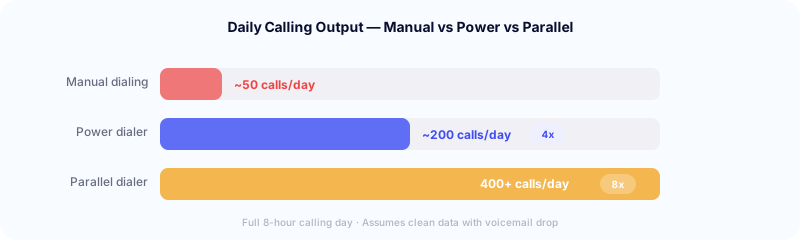
For a full 8-hour calling day, that works out to roughly 150-250 calls in power dial mode (accounting for conversations, breaks, and note-taking) versus 40-70 with manual dialing.
But dials don’t equal conversations. With average B2B connection rates around 16-17% (per Cognism’s data), 200 dials might yield 30-35 live conversations. That’s still 3-4x what you’d get manually.
An important caveat from Optifai’s analysis of 423 B2B teams: pushing beyond 60 dials per hour often degrades call quality. Reps rush through discovery questions, and meetings booked per dial actually drops. Top-performing teams average one meeting per 40 dials (2.5% conversion), while the top 5% reach one meeting per 15-20 dials (5-8%). Quality and volume both matter.
Are Power Dialers Legal? (TCPA & ATDS)
This is a common concern, and the answer changed significantly in 2021.
The TCPA restricts the use of an Automatic Telephone Dialing System (ATDS) — equipment that can store or produce telephone numbers using a random or sequential number generator and dial them. The original interpretation was broad and caught many dialer types.
Then came Facebook v. Duguid (April 2021), a unanimous Supreme Court decision that narrowed the ATDS definition. The Court ruled that a device qualifies as an ATDS only if it can generate numbers using a random or sequential number generator — not simply by storing and dialing from a pre-loaded list.
Most modern power dialers dial from stored contact lists. They don’t generate numbers randomly or sequentially. Under the Duguid ruling, they generally do not qualify as an ATDS and are not subject to the TCPA’s ATDS-specific restrictions.
That said, other TCPA rules still apply regardless of dialer type:
- Scrub your list against the National Do-Not-Call Registry
- Honor opt-out requests (within 10 business days as of April 2025)
- Only call between 8 AM and 9 PM in the recipient’s local time zone
- Display accurate caller ID information
- Identify yourself and your company on every call
The Duguid ruling was a major win for sales teams using power dialers. It removed a significant area of legal ambiguity. But it doesn’t mean anything goes — DNC compliance, calling hours, and consent rules still apply.
Key Features of Modern Power Dialers
The best power dialers go well beyond auto-dialing. Here’s what to look for:
Voicemail drop. Pre-record a voicemail message and drop it with one click when you hit a voicemail box. This saves 20-30 seconds per voicemail and keeps reps in rhythm. Without it, leaving individual voicemails burns through a huge chunk of calling time.
Local presence dialing. Automatically match your outbound caller ID to the prospect’s area code — and with CallerGuardian, monitor those numbers in real time so they stay clean. Local numbers get answered at nearly 4x the rate of toll-free numbers. Maintaining a clean caller ID reputation is essential for keeping answer rates high. For a deeper look at how this works, see our guide to local presence dialing.
Embedded CRM dialer. The best power dialers don’t just sync with your CRM — they embed directly inside it as a native widget. Symbo’s dialer installs inside Salesforce, HubSpot, Pipedrive, Zoho, and GoHighLevel. Reps dial, take notes, and log outcomes without ever leaving their CRM. For Bullhorn and other CRMs, the Chrome extension adds click-to-dial in the browser.
Call recording and AI transcription. Record every call for coaching and compliance. Modern dialers add AI transcription and summaries, so managers can review calls without listening to full recordings.
One-click dispositions with hotkeys. Standardized outcome labels (e.g., “connected,” “voicemail,” “not interested”) that reps assign with a single keystroke — no dropdowns, no mouse clicks. Fast dispositions keep data clean and can trigger automated follow-up sequences.
Real-time analytics. Track dials per hour, connection rates, average talk time, and meetings booked — live, not after the fact. Managers can coach in real time instead of reviewing last week’s numbers.
Who Should Use a Power Dialer?
Strong fit:
- SDR and BDR teams doing high-volume prospecting (50+ calls per day)
- Inside sales teams working through call lists
- Recruiting and staffing firms sourcing candidates
- Insurance and real estate agents working inbound leads
- Teams calling local businesses (contractors, plumbers, home services) where volume and local presence matter
- Any team where reps are manually dialing and losing time between calls
Less ideal:
- Account executives making 5-10 strategic calls per day (the overhead isn’t worth it)
- Teams with very small contact lists (you’ll burn through them too fast)
- Situations where every call requires 10+ minutes of pre-call research (power dialing rewards quick transitions between calls)
The ROI Case
The math on power dialers is straightforward. If your reps go from 40 manual dials per day to 150+ with a power dialer, and your connection rate stays steady, you’re tripling your conversations. Industry research consistently shows a 3-4x increase in calls per hour with automated dialing versus manual.
Teams that switch from manual dialing to a power dialer typically see 50 calls per day jump to 200+ — and when combined with local presence and automated sequences, the downstream impact on meetings booked compounds quickly.
At most power dialer price points, the breakeven is fast. One additional meeting booked per week typically covers the cost. See Symbo’s pricing for reference.
Getting Started
If you’re evaluating power dialers, here’s a practical approach:
- Measure your current state. How many dials per day are your reps making? What’s the connection rate? How many meetings per week?
- Run a pilot. Start with 2-3 reps for 30-60 days. Measure the same metrics.
- Look for at least a 2x lift in dials per day before committing to a full rollout.
- Don’t sacrifice quality. If meetings booked doesn’t increase proportionally with dials, your reps may be rushing conversations. Balance volume with call quality.
- Integrate with your CRM from day one. If call data doesn’t flow into your CRM automatically, reps will skip logging — and you’ll lose visibility.
Power dialing isn’t new technology, but it’s still one of the highest-leverage tools for outbound sales teams. The teams that win aren’t just making more calls — they’re making more calls with better data, better context, and better follow-up. Pair a power dialer with multi-channel sequences and your call outcomes automatically trigger the right follow-up — email, text, or next sequence — without the rep lifting a finger.
Symbo’s dialer gives your team parallel, power, and click-to-dial in a single platform — with LocalEdge local presence, CallerGuardian spam monitoring, embedded CRM widgets, and AI transcription built in. Book a demo to see it in action.